
Choosing the right content management system isn’t just a technical decision anymore. For businesses in the UAE looking to compete online, your CMS determines how quickly you can publish content, how well your site performs on mobile devices, and whether you can adapt to AI-powered search engines that are changing how customers find services.
Most business owners ask their developers which CMS to use, and they usually get recommended whatever that developer is most comfortable building with. But the best CMS for your business depends on your goals, your team’s technical abilities, and how you plan to grow your digital presence over the next few years.
This guide breaks down the real considerations for UAE businesses choosing a CMS in 2026, including which platforms handle Arabic content properly, which ones integrate with local payment gateways, and which systems will help you rank on both Google and generative AI engines like ChatGPT.
Which CMS gives you the most control without requiring a developer?
WordPress remains the dominant choice for businesses that want full control without constantly hiring developers. Nearly 43% of all websites globally run on WordPress, and for good reason. The platform offers over 60,000 plugins that extend functionality, from booking systems to membership areas to e-commerce stores.
For UAE service businesses, WordPress provides built-in multilingual capabilities through plugins like WPML or Polylang, making it straightforward to offer content in both English and Arabic. The Gutenberg editor allows non-technical team members to build custom page layouts without touching code.
However, WordPress requires regular maintenance. Security updates, plugin compatibility checks, and performance optimization are ongoing responsibilities. If your team lacks technical knowledge, you’ll need a reliable web development agency in Dubai to handle these tasks or risk security vulnerabilities.
Webflow has emerged as a strong alternative for businesses that want design flexibility without the maintenance burden. The platform handles hosting, security, and performance automatically. The visual editor gives designers precise control over every element, and the CMS allows content editors to update pages through a clean, intuitive interface.
Webflow works exceptionally well for businesses focused on conversion rate optimization. Every element can be customized to match your brand, and the built-in interactions and animations help guide visitors toward your call-to-action buttons. The downside is cost. Webflow’s pricing tiers are higher than WordPress hosting, and migrating away from the platform later requires rebuilding your entire site.
Shopify dominates e-commerce for good reason. The platform was built specifically for online stores, and every feature reflects that focus. Payment processing works seamlessly with UAE banks, inventory management is straightforward, and the app ecosystem provides solutions for everything from abandoned cart recovery to customer loyalty programs.
For businesses selling physical products or services with clear pricing tiers, Shopify removes most technical barriers. You can launch a professional online store in days rather than months. However, Shopify charges transaction fees on top of payment processing fees unless you use Shopify Payments, which isn’t available in all regions. The platform also limits customization compared to WordPress or Webflow.
How do different CMS platforms perform on mobile devices in the UAE market?
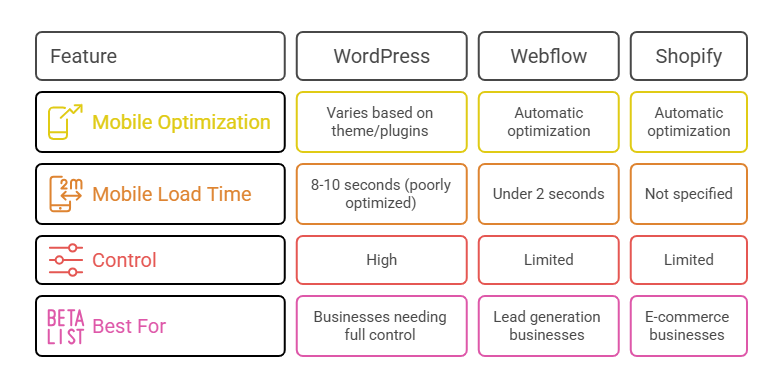
Mobile traffic accounts for over 65% of web browsing in the UAE, making mobile performance non-negotiable. Your CMS choice directly impacts how quickly pages load on smartphones and how smoothly visitors can navigate your site on smaller screens.
WordPress performance varies dramatically based on your theme and plugins. A poorly optimized WordPress site can take 8-10 seconds to load on mobile connections, causing visitors to abandon before your page even appears. Modern themes like GeneratePress or Kadence are built for speed, but you’ll need to actively manage image optimization, implement caching, and minimize unnecessary plugins.
The advantage of WordPress is control. You can implement advanced performance techniques like lazy loading, critical CSS, and WebP image formats. Tools like WP Rocket or LiteSpeed Cache make optimization accessible even for non-technical users. But this flexibility means performance is your responsibility, not the platform’s.
Webflow automatically optimizes every site for mobile performance. Images are compressed and served in modern formats, code is minified, and pages are delivered through a global content delivery network. Webflow sites typically load in under 2 seconds on mobile devices without any additional configuration.
This automatic optimization matters for businesses focused on lead generation. Every second of load time reduces conversion rates by approximately 7%. If your website exists primarily to generate inquiries and bookings, Webflow’s performance advantages translate directly to more customers.
Shopify handles mobile optimization automatically, with one crucial advantage. The platform’s mobile checkout process has been refined through billions of transactions. The checkout flow works seamlessly on smartphones, with payment methods optimized for UAE customers including credit cards, Apple Pay, and cash on delivery.
For e-commerce businesses, Shopify’s mobile conversion rates typically exceed custom-built solutions. The platform has eliminated common friction points that cause abandoned carts on mobile devices.
What CMS features actually help you rank on AI search engines?
Traditional SEO focused on keywords and backlinks. Generative engine optimization requires structured content that AI systems can easily parse and understand. Your CMS needs to support schema markup, clear content hierarchy, and semantic HTML that helps AI engines extract accurate information about your business.
WordPress offers extensive schema markup options through plugins like Rank Math or Yoast SEO. These tools automatically add structured data to your pages, helping AI engines understand whether content represents an article, product, service, or FAQ section. This structured approach is essential for appearing in AI-generated responses when potential customers ask questions related to your services.
The challenge with WordPress is ensuring consistency. Multiple team members publishing content can create inconsistent formatting and metadata. Clear editorial guidelines and content templates help maintain the structure AI engines prefer. Working with a digital marketing agency in UAE that understands both technical implementation and content strategy ensures your WordPress site is properly optimized for generative AI visibility.
Webflow provides clean, semantic HTML by default, which AI engines parse more easily than bloated code from some WordPress themes. The platform’s CMS fields allow you to structure content consistently across all pages, ensuring every service description or case study follows the same format.
This consistency matters for GEO because AI engines look for patterns in how information is presented. When your content follows predictable structures, AI systems can extract key details with higher confidence, increasing the likelihood your business appears in generated responses.
Shopify’s product structure naturally supports GEO for e-commerce businesses. Product titles, descriptions, prices, and specifications are stored in dedicated fields, making it easy for AI engines to understand what you sell and how it differs from competitors. The platform’s built-in review system also provides social proof that AI engines reference when evaluating product quality.
Understanding GEO services for UAE businesses becomes increasingly important as more customers use AI tools to research purchases before visiting websites directly.
Which platforms integrate best with UAE business tools and payment systems?
Integration capabilities determine how well your website connects with tools you already use. Customer relationship management systems, email marketing platforms, payment gateways, and booking systems all need to communicate with your CMS seamlessly.
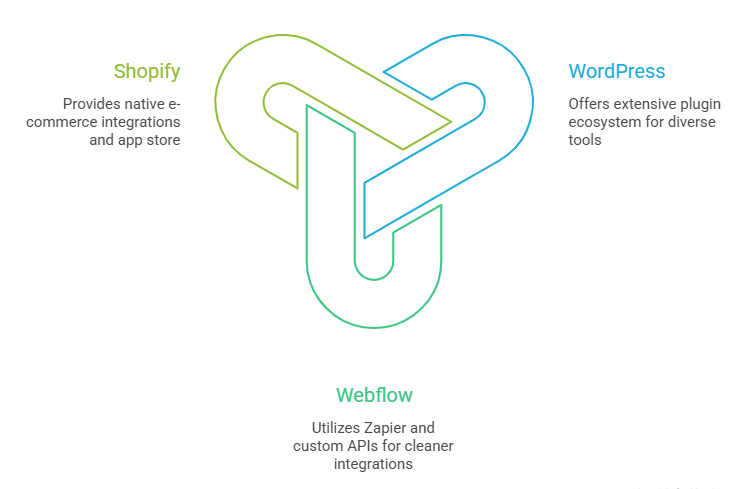
WordPress wins on integration flexibility. The plugin ecosystem includes connectors for virtually every business tool available. Whether you need to sync customer data with Zoho CRM, send abandoned cart emails through Mailchimp, or accept payments through Network International, plugins exist to handle the integration.
However, managing multiple integrations creates complexity. Each plugin represents another component that needs updates and can potentially conflict with other plugins. Businesses using more than 20 plugins often experience stability issues that require developer intervention to resolve.
Webflow integrations work through Zapier or custom API connections. The platform doesn’t offer the same plugin ecosystem as WordPress, but most popular business tools can connect through these methods. The integration process requires more technical knowledge initially but results in cleaner implementations with fewer potential conflicts.
For businesses with specific workflow requirements, Webflow’s approach often proves more reliable long-term. Rather than cobbling together multiple plugins, integrations are built deliberately with clear data flows.
Shopify provides native integrations with most tools e-commerce businesses need. The Shopify App Store offers thousands of verified apps that install with one click. Payment gateway integration is particularly robust, with support for major UAE providers including Telr, PayTabs, and Checkout.com.
The platform’s integration strength lies in its focused ecosystem. Because every integration is built specifically for e-commerce, they tend to work more reliably than general-purpose plugins adapted for online stores.
How much does each CMS actually cost when you factor in everything?
Listed prices for CMS platforms rarely reflect total ownership costs. Hosting, premium plugins, custom development, ongoing maintenance, and migration costs all impact your actual investment.
WordPress appears inexpensive initially. The software itself is free, and basic hosting starts around AED 50 monthly. However, professional WordPress sites typically require premium themes (AED 200-400), essential plugins for security, performance, and SEO (AED 100-300 monthly), and regular maintenance (AED 500-2000 monthly) depending on complexity.
A properly maintained WordPress site for a service business typically costs AED 3,000-8,000 annually including hosting, security, and basic updates. Custom development for specific features adds significantly to this baseline. The advantage is scalability. As your needs grow, WordPress can adapt without requiring a complete rebuild.
Webflow pricing is transparent but higher upfront. Basic plans start at AED 100 monthly, but business sites typically need the CMS plan at AED 120 monthly or Business plan at AED 160 monthly for more robust features. These prices include hosting, security, and automatic backups.
Total annual cost for a Webflow business site ranges from AED 4,500-8,500 depending on plan tier and any custom development needed. This cost is predictable, with no surprise maintenance fees or plugin subscriptions. For businesses that value predictability and minimal technical overhead, Webflow’s pricing model makes budgeting straightforward.
Shopify costs vary based on your sales volume. The Basic plan at AED 105 monthly works for businesses just starting e-commerce, but growing stores quickly need the Shopify plan at AED 315 monthly or Advanced plan at AED 1,315 monthly for lower transaction fees and advanced features.
Transaction fees add significant costs. Shopify charges 2% on the Basic plan, 1% on mid-tier plans, and 0.5% on Advanced plans for each sale using third-party payment gateways. A store processing AED 50,000 monthly in sales pays AED 1,000 in transaction fees alone on the Basic plan.
Should UAE businesses choose local or international CMS hosting?
Hosting location impacts website speed for UAE visitors and affects data residency requirements for certain business types. Most major CMS platforms offer hosting options that serve content from servers in or near the UAE.
WordPress hosting flexibility allows you to choose providers with UAE data centers. Companies like Bluehost, SiteGround, and local providers offer hosting with servers in Dubai or the broader Middle East region. This geographic proximity reduces latency, making pages load faster for your primary audience.
For businesses handling sensitive customer data or operating in regulated industries, hosting data within UAE borders may be required. WordPress hosting can be configured to meet these requirements, though you’ll need to verify your hosting provider’s data center locations and compliance certifications.
Webflow uses AWS CloudFront for content delivery, with edge locations in UAE that cache and serve your content from nearby servers. While Webflow doesn’t allow you to choose specific data centers, the distributed network ensures fast load times for UAE visitors regardless of where origin servers are located.
Shopify operates globally distributed infrastructure optimized for e-commerce performance. The platform automatically serves content from the closest available server to each visitor. For UAE-based stores, this means content is typically delivered from Middle East or European data centers with minimal latency.
If you’re exploring options or need guidance on implementation, we’ve covered complementary topics in How to create a website that generates leads automatically? and Mobile-first web design why it matters for UAE businesses?, which address conversion optimization and mobile performance strategies that complement your CMS choice.
How easy is it to move between CMS platforms if your needs change?
Migration difficulty should factor into your initial CMS decision. Some platforms trap your content in proprietary formats that require expensive rebuilds if you decide to switch later.
WordPress migration is relatively straightforward. Content exports to XML files that can be imported into other WordPress sites or converted for use on different platforms. The challenge lies in custom functionality built through plugins. Moving away from WordPress means rebuilding any custom features, though basic content transfers easily.
Thousands of agencies worldwide work with WordPress, making it easy to find qualified help for migrations or rebuilds. The platform’s popularity ensures you’re never locked into working with a single developer or agency.
Webflow migration is more complex. Content exports to CSV files, but design elements and interactions don’t transfer to other platforms. Moving from Webflow to WordPress or another CMS requires rebuilding your site’s design from scratch, though content can be imported relatively easily.
This migration difficulty is Webflow’s primary drawback. Once you’ve invested in building a Webflow site, switching platforms means significant additional investment. However, for businesses satisfied with Webflow’s capabilities, this rarely becomes an issue in practice.
Shopify migration varies based on your destination platform. Moving to another e-commerce platform like WooCommerce or BigCommerce is manageable, with tools available to export product catalogs, customer data, and order history. Moving to a non-e-commerce CMS is more complex and rarely makes sense for established online stores.
The more you’ve customized Shopify through apps and custom code, the harder migration becomes. Basic stores transfer easily, but heavily customized stores may require complete rebuilds on new platforms.
Which CMS best supports multilingual content for UAE markets?
Operating in the UAE often means serving customers who prefer content in multiple languages, particularly English and Arabic. Your CMS needs to handle multilingual content without creating duplicate work or confusion for content editors.
WordPress multilingual support works through plugins like WPML, Polylang, or TranslatePress. These plugins create separate versions of each page for different languages, with language switchers that let visitors choose their preference. The plugins handle technical aspects like hreflang tags that tell search engines about your multilingual structure.
Quality varies significantly based on which plugin you choose and how well your theme supports right-to-left languages like Arabic. Some WordPress themes break visually when displaying Arabic content, requiring custom CSS adjustments. Working with developers familiar with multilingual UAE sites prevents these issues.
Webflow multilingual support is less mature than WordPress. The platform doesn’t offer native multilingual capabilities, requiring workarounds like creating separate collections for each language or using third-party services like Weglot. These solutions work but add complexity and cost to site management.
For businesses heavily focused on Arabic content alongside English, Webflow’s limitations may outweigh its other advantages. The platform works well for English-primary sites with occasional translation needs, but managing large amounts of multilingual content becomes cumbersome.
Shopify handles multilingual stores through Shopify Markets, which allows you to create localized versions of your store for different regions. Product descriptions, checkout pages, and customer communications can all be translated and customized per market.
The system works particularly well for e-commerce businesses selling to multiple countries in the GCC region, allowing you to adjust pricing, shipping options, and payment methods based on customer location while maintaining a single product catalog.
What CMS provides the best foundation for growing from local to regional presence?
Scalability determines whether your CMS can grow with your business or needs replacement as you expand. A platform suitable for a local service business with 50 pages might not handle a regional operation with thousands of products or locations.
WordPress scales remarkably well with proper architecture. Sites with hundreds of thousands of pages run successfully on WordPress, though they require carefully chosen hosting, caching strategies, and database optimization. The platform has no inherent limitations on content volume or traffic levels.
The scaling challenge with WordPress comes from accumulated technical debt. Sites built without clear architecture become difficult to modify as they grow. Regular audits and refactoring prevent this issue, but require ongoing investment in professional development.
Webflow handles scaling through its infrastructure automatically. The platform’s hosting can accommodate traffic spikes without manual intervention, and sites remain fast regardless of content volume within reasonable limits. The practical limitation is cost. As traffic and content needs grow, Webflow pricing increases accordingly.
For businesses planning significant expansion, Webflow’s costs can exceed WordPress with managed hosting. However, the reduced technical complexity and automatic scaling mean fewer resources spent on infrastructure management.
Shopify scaling works seamlessly for most growing e-commerce businesses. The platform handles sudden traffic spikes during sales or promotions without performance degradation, and stores with tens of thousands of products operate smoothly. Shopify Plus, the enterprise tier, supports brands processing millions in monthly sales.
The scaling limitation is customization. As stores grow more complex with unique business rules and customer experiences, Shopify’s templated approach can feel restrictive compared to fully custom platforms.
FAQ
What is the most affordable CMS for small businesses in UAE?
WordPress offers the lowest entry cost for small businesses, with hosting starting around AED 50 monthly and essential plugins adding AED 100-200 monthly. Total first-year costs including setup typically range from AED 3,000-6,000 for a professional business website. However, affordability must be weighed against ongoing maintenance requirements and technical knowledge needed to keep the site secure and performant.
Can I switch CMS platforms after my website is built?
Yes, but migration complexity varies significantly. Moving from WordPress to another WordPress site is straightforward, while switching between different platforms like Webflow to WordPress requires rebuilding design elements even though content can be exported. Shopify to WooCommerce migrations are manageable for e-commerce stores. Budget 30-60% of original development costs for platform migrations, with complex sites requiring more extensive rebuilds.
Which CMS is best for ranking on both Google and AI search engines?
WordPress offers the most flexibility for both traditional SEO and GEO through plugins that add proper schema markup, optimize content structure, and manage technical SEO elements. However, Webflow’s clean code and semantic HTML provide inherent advantages for AI engines that parse website content. Success on both Google and generative AI platforms depends more on content strategy and structured information than the CMS itself, though WordPress and Webflow both provide the necessary technical foundations.
Do I need a developer to manage a modern CMS?
Webflow and Shopify are specifically designed for non-technical users to manage content independently, with visual editors that require no coding knowledge. WordPress is accessible for basic content updates but often requires developer support for plugin management, security updates, and troubleshooting when issues arise. Most UAE service businesses benefit from having a technical partner for any CMS platform, even those marketed as no-code solutions, to handle optimization, integrations, and complex customizations.
How important is mobile optimization for business websites in UAE?
Critical. Over 65% of UAE web traffic comes from mobile devices, and Google prioritizes mobile-optimized sites in search rankings. All modern CMS platforms offer mobile-responsive themes, but actual mobile performance varies based on implementation. Page load speed on mobile connections directly impacts both search rankings and conversion rates, with each second of delay reducing conversions by approximately 7%. Choose a CMS that prioritizes mobile performance and work with developers who test thoroughly on actual mobile devices using UAE network conditions.
What CMS features matter most for generating business leads?
Form builders, CRM integrations, and conversion tracking capabilities determine how effectively your CMS turns visitors into leads. WordPress offers the most integration options through plugins, connecting to virtually any CRM or marketing automation platform. Webflow provides clean form implementations with built-in spam protection and simple integrations through Zapier. The CMS matters less than the overall website strategy, including clear calls-to-action, trust signals, and content that addresses specific customer concerns. A well-designed website on any major CMS will outperform a poorly executed site on the “best” platform.
Choosing the right foundation for your digital growth
Your CMS decision impacts every aspect of your digital marketing effectiveness. The right platform makes content updates simple, supports your team’s capabilities, and provides the technical foundation for visibility on both traditional and AI-powered search engines.
For most UAE service businesses, WordPress offers the best balance of flexibility, cost-effectiveness, and long-term scalability, provided you have access to reliable technical support. Creative agencies and businesses prioritizing design excellence find Webflow’s visual approach and automatic optimization compelling despite higher costs. E-commerce businesses benefit from Shopify’s focused feature set and proven checkout optimization.
The worst decision is choosing a CMS based solely on what your developer prefers or which platform has the lowest sticker price. Your website represents your business online, and the underlying system determines how easily you can adapt to changing customer behaviors and emerging technologies like generative AI search.
Consider your team’s technical abilities, budget for ongoing management, growth plans over the next three years, and specific business requirements before committing to a platform. Most businesses succeed by selecting a widely-supported CMS and investing in proper implementation rather than chasing the newest platform with the most marketing hype.
If you’re building or rebuilding your business website and need guidance on which CMS fits your specific situation, getting expert input early prevents costly mistakes later.