

You’ve spent hours perfecting your website’s design. Your product photos look sharp, your copy is on point, and you’re ready to watch the leads roll in. Then you check your analytics a month later and… nothing. Traffic is flat. Your bounce rate is through the roof. What went wrong?
Here’s what most UAE business owners miss: Google doesn’t care how beautiful your website looks if it takes forever to load. In a market where 87% of UAE internet users browse on mobile devices and expect instant results, a slow website isn’t just annoying. It’s costing you customers, rankings, and revenue every single day.
The truth is, page speed has become one of Google’s core ranking signals. But it’s not just about pleasing the algorithm anymore. It’s about meeting the expectations of UAE consumers who are shopping, comparing, and making decisions faster than ever before. When your competitor’s website loads in two seconds and yours takes six, guess who’s getting the sale?
Let’s break down exactly how fast your website needs to be, why it matters for your business in the UAE, and what you can do about it today.
What does Google actually say about website loading speed?
Google has been crystal clear about this since 2018, when they officially made page speed a ranking factor for mobile searches. But they didn’t just wake up one day and decide slow websites were bad. The data told the story first.
Google’s research found that 53% of mobile users abandon a site that takes longer than three seconds to load. Think about that for a moment. More than half of your potential customers are gone before they even see your homepage if your site is sluggish.
In 2020, Google doubled down with the introduction of Core Web Vitals, a set of specific metrics that measure real user experience. These aren’t technical benchmarks that only developers understand. They track what actual visitors experience when they land on your page: how quickly content appears, how stable the page is while loading, and how responsive it feels when they try to interact.
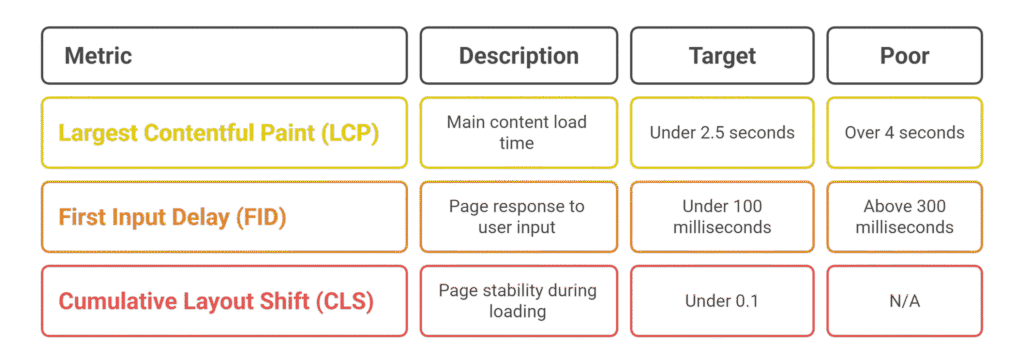
The three Core Web Vitals Google measures are:
Largest Contentful Paint (LCP): How long it takes for the main content on your page to load. Google wants this under 2.5 seconds. Anything over 4 seconds is considered poor.
First Input Delay (FID): How quickly your page responds when someone tries to click a button or tap a link. This should be under 100 milliseconds. Above 300 milliseconds and you’re in trouble.
Cumulative Layout Shift (CLS): Whether your page jumps around while loading. You know that annoying experience when you’re about to click something and the page shifts, making you click the wrong thing? That’s what this measures. Google wants a score under 0.1.
Google doesn’t publish a simple “your website must load in X seconds” rule because the relationship between speed and rankings is more nuanced. A website loading in 1.5 seconds will generally outperform one loading in 5 seconds, but it’s not the only factor. Content quality, relevance, backlinks, and dozens of other signals still matter.
However, here’s what we know from working with UAE businesses: when everything else is equal, the faster website wins. And when you’re competing for local searches in Dubai, Abu Dhabi, or Sharjah, that speed advantage can be the difference between page one and page three.
Why does page speed matter more for UAE businesses?
The UAE digital landscape has some unique characteristics that make page speed even more critical than in other markets.
First, mobile usage in the UAE is among the highest in the world. A recent study showed that UAE residents spend an average of 8 hours per day on their mobile devices. That’s not just social media scrolling. People are researching businesses, comparing prices, booking services, and making purchases all from their phones. If your website isn’t optimized for mobile speed, you’re essentially closing your doors to the majority of your potential customers. Any web development company in UAE will tell you that mobile optimization isn’t optional anymore, it’s the foundation of digital success in this market.
Second, the UAE market is incredibly competitive. Whether you’re running a restaurant in JBR, a beauty salon in Deira, or a consulting firm in Business Bay, you’re competing with dozens of similar businesses within a few kilometers. When someone searches “best Italian restaurant near me” or “emergency plumber Dubai Marina,” they’re not going to wait around for a slow website to load. They’ll hit the back button and try the next result.
Third, consumer expectations in the UAE are higher than almost anywhere else. This is a market where same-day delivery is standard, where customer service is a key differentiator, and where quality matters more than price for many segments. UAE consumers expect excellence, and that includes digital experiences. A slow website signals poor quality and lack of attention to detail.
There’s also a technical reality specific to the region. While internet infrastructure in the UAE is generally excellent, hosting location matters enormously. If your website is hosted on a server in the United States or Europe, there’s a physical delay as data travels thousands of kilometers. For UAE businesses serving UAE customers, using a local or regional server can shave hundreds of milliseconds off your website load time.
Finally, consider the business cost. The UAE has one of the highest costs per click (CPC) for Google Ads in the region. If you’re paying 15 to 50 dirhams every time someone clicks your ad, only to have them leave immediately because your page is slow, you’re literally burning money. Even a one-second improvement in website load time can increase conversion rates by 7% according to industry data. For a business spending 10,000 dirhams monthly on ads, that’s 700 dirhams in additional revenue, or 8,400 dirhams annually, just from getting faster.
How do I measure my current website speed accurately?
Before you can improve your website speed, you need to know where you stand. But here’s the tricky part: there are dozens of speed testing tools out there, and they often give you different results. Which one should you trust?
The most reliable starting point is Google’s own tools, because they’re measuring exactly what Google cares about for rankings.
Google PageSpeed Insights is your primary tool. Just enter your URL and it will test both mobile and desktop versions of your site. You’ll get a score from 0 to 100, along with specific recommendations for improvement. More importantly, it shows you your Core Web Vitals scores based on real user data from Chrome browsers (if your site has enough traffic).
The scoring system works like this:
- 90-100: Fast (good)
- 50-89: Moderate (needs improvement)
- 0-49: Slow (poor)
But don’t obsess over getting a perfect 100 score. What matters more is whether you’re in the “good” range for Core Web Vitals and whether your site feels fast to real users.
Google Search Console is your second essential tool. If you’ve verified your website with Search Console (and you should have), you can check the Core Web Vitals report to see how your pages perform in the real world. This data comes from actual Chrome users visiting your site, which makes it more reliable than synthetic testing.
Search Console will categorize your URLs into three groups: Good, Needs Improvement, and Poor. Your goal is to get as many URLs as possible into the “Good” category.
Other useful tools include:
GTmetrix: Gives you detailed waterfall charts showing exactly which files are slowing down your site. It’s more technical but incredibly useful for developers.
Pingdom: Simple interface with testing from multiple global locations. Useful for checking how your site performs for international visitors.
WebPageTest: The most detailed tool available, letting you test from specific devices and connection speeds. Great for simulating how your site performs on 3G or 4G networks.
When testing your site, follow these practices for accurate results:
Test multiple pages, not just your homepage. Product pages, service pages, and blog posts often load differently.
Test at different times of day. Server performance can vary based on traffic levels.
Test on real devices if possible. Grab your phone and actually visit your site. How does it feel? That’s what your customers are experiencing.
Look beyond the overall score. A site scoring 85 with great Core Web Vitals might outperform a site scoring 95 with poor user metrics.
For UAE businesses specifically, make sure you’re testing with a Middle East server location when possible. Tools like GTmetrix and Pingdom let you choose your test location. Select somewhere close to the UAE to get realistic results for your target audience.
What are the biggest factors slowing down my website?
After testing hundreds of websites for UAE businesses, we’ve seen the same issues pop up again and again. The good news is that most speed problems come down to a handful of fixable issues.
Images are almost always the biggest culprit. A single unoptimized product photo can be 3-5 MB in size. When you have ten images on a page, you’re forcing visitors to download 30-50 MB of data before they can see your content. On a 4G connection, that could take 15-20 seconds.
Most images on websites don’t need to be high resolution. A hero banner that displays at 1920 pixels wide doesn’t need to be saved at 4000 pixels. Product photos that appear as thumbnails at 300×300 pixels shouldn’t be full-resolution 3000×3000 images. Yet we see this constantly, especially with websites built by designers who prioritize visual quality over performance.
Hosting quality makes a massive difference. Cheap shared hosting packages that cost 10-20 dirhams per month are popular with small businesses trying to save money. But these servers are often overloaded, located far from the UAE, and use outdated technology. When 500 other websites are sharing the same server resources, your site slows to a crawl during peak hours.
Unoptimized code is another frequent issue. Websites built with page builders like Elementor or Divi are incredibly popular because they let non-technical users create beautiful designs. But these tools often generate bloated code with excessive CSS and JavaScript. We’ve seen websites loading 50-70 separate JavaScript files just to display a simple contact form.
Third-party scripts can destroy your speed. Every Facebook Pixel, Google Analytics tag, live chat widget, and marketing tool you add to your site requires additional files to load. Some of these scripts are poorly coded and can delay everything else on your page. We’ve audited sites where a single marketing tool was adding 3-4 seconds to the load time.
Lack of caching is surprisingly common. Caching means storing a pre-generated version of your page so it doesn’t need to be rebuilt from scratch every time someone visits. Without caching, your server has to query the database, generate all the HTML, and send everything to the visitor on every single page load. With caching enabled, most of that work is skipped. Yet many small business websites have no caching configured at all.
Not using a Content Delivery Network (CDN) puts UAE businesses at a disadvantage. If your website files are stored on a single server in Dubai and someone in Abu Dhabi visits your site, the data has to travel that distance. It’s not far, but it’s measurable. With a CDN, your files are stored on multiple servers around the region, so visitors always connect to the closest one.
Too many fonts can slow things down. Custom fonts have become incredibly popular, and they do make websites look more polished and branded. But loading 4-5 font families with multiple weights (regular, bold, italic) can add hundreds of kilobytes of data and multiple server requests.
Database bloat affects WordPress sites especially. If you’re using WordPress, your database stores everything: posts, pages, revisions, spam comments, plugin settings. Over time, this database can grow massive with unnecessary data, slowing down every query your site makes.
The interesting pattern we’ve noticed with UAE businesses is that most websites have multiple issues compounding each other. It’s rarely just one thing. A site might have large images, slow hosting, no caching, and excessive plugins all at once. The good news is that fixing several of these issues together can lead to dramatic improvements.
Can I improve my website speed without a developer?
Absolutely. While some optimizations require technical expertise, there’s plenty you can do yourself to speed up your site significantly.
Start with your images. This is the single biggest impact you can have with minimal technical knowledge. Before uploading any image to your website, compress it using a free tool like TinyPNG or ShortPixel. These tools can reduce file sizes by 60-80% without any visible quality loss. For a business website with 50 images, this alone could save 20-30 MB of data.
If your site is already live with unoptimized images, install a plugin like Smush (for WordPress) or ShortPixel that can automatically optimize your existing image library. Yes, it takes time to process hundreds of images, but you only do it once.
Make sure you’re also using the right image format. JPEGs work best for photos. PNGs are better for logos and graphics with transparency. And newer formats like WebP can be even smaller while maintaining quality, though not all browsers support them yet.
Enable caching with a plugin. If you’re on WordPress, this is embarrassingly easy. Install a free plugin like WP Super Cache or W3 Total Cache, activate it, and use the default settings. That’s it. You’ve just implemented caching and probably cut your load time in half. More advanced users can tweak the settings later, but the default configuration works perfectly well for most small business sites.
Choose better hosting. If you’re on a bottom-tier shared hosting plan, consider upgrading to a better provider or a higher tier. Yes, it costs more, but the difference between spending 20 dirhams per month and 100 dirhams per month is barely noticeable to your business budget, while the performance improvement is dramatic.
Look for hosting providers with servers in the UAE or at least in the Middle East. Providers like Emirati-based hosts or international hosts with UAE data centers can make a real difference for local audiences.
Clean up your plugins. Go through your WordPress plugins and deactivate anything you’re not actively using. Every plugin adds code and potential database queries. If you installed something to test six months ago and forgot about it, remove it. Most sites can function perfectly well with 10-15 carefully chosen plugins instead of 30-40.
Lazy load your images and videos. Lazy loading means images below the fold only load when a visitor scrolls down to see them. Why force someone to download images they might never see? Most modern WordPress themes have this feature built in, or you can add it with a plugin. For videos, never auto-play them. Let visitors click to play, which prevents massive video files from loading unnecessarily.
Simplify your design. This might sting a bit, but sometimes the beautiful animated sliders, parallax backgrounds, and fancy hover effects are killing your performance. If you’re not a technical person, the easiest way to speed up your site might be choosing a simpler, faster theme that does less but loads quicker. A clean, fast website converts better than a slow, flashy one every single time.
Switch to system fonts or limit custom fonts. If your brand guidelines allow it, using system fonts (the ones already on your visitor’s device) means zero load time for typography. If you need custom fonts, limit yourself to one font family with 2-3 weights maximum. You don’t need eight different font combinations to have a professional website.
For businesses using website builders like Wix, Squarespace, or Shopify, your options are more limited since you don’t have full control over the code. But you can still optimize images before uploading, use their built-in image compression features, remove unnecessary apps and widgets, and choose simpler templates.
The key mindset shift is this: every element on your page has a speed cost. Before adding anything, ask whether it’s truly necessary for your business goals or if it’s just decorative. When in doubt, remove it.
How much speed improvement is enough to see results?
This is the question every business owner really wants answered. If you invest time and money into speeding up your website, what kind of return should you expect?
The data tells us that improvements are not linear. Shaving one second off a load time that was already three seconds has a bigger impact than shaving one second off a load time that was ten seconds. In other words, the first improvements you make tend to deliver the biggest returns.
Research from Google shows that when page load time increases from 1 second to 3 seconds, the probability of a bounce increases by 32%. If it reaches 5 seconds, the bounce probability jumps to 90%. That means almost everyone leaves. Going from 6 seconds to 10 seconds doesn’t make things much worse because you’ve already lost most visitors. But going from 3 seconds to 1.5 seconds? That’s a game changer.
For conversion rates, the data is equally compelling. A 2019 study by Deloitte found that a 0.1 second improvement in mobile site speed can increase conversion rates by 8.4% for retail sites. For travel sites, the improvement was 10.1%. Even small speed gains translate to meaningful business results.
But here’s what matters most: perception. Human psychology plays a huge role in how fast a website feels. If your site appears to load quickly, even if the full page takes another second or two to complete, visitors stay engaged. This is why techniques like lazy loading and progressive image loading work so well. They make the site feel fast even while additional content loads in the background.
For UAE businesses specifically, aim for these targets:
Mobile load time under 3 seconds on a 4G connection. This puts you in the top tier for user experience and should keep your bounce rate reasonable.
Core Web Vitals in the “good” range. That means LCP under 2.5 seconds, FID under 100 milliseconds, and CLS under 0.1. These are Google’s official benchmarks and meeting them gives you a clear ranking advantage.
Above 80 on Google PageSpeed Insights. While the score itself isn’t a ranking factor, it’s a useful proxy for overall performance. Sites scoring above 80 generally have solid technical foundations.
When you make improvements, you should start seeing results within a few weeks. Google needs time to recrawl your pages and reassess their speed. Don’t expect overnight changes to your rankings, but do track these metrics:
Bounce rate should decrease. If people were leaving immediately because your site was slow, fixing that will keep them around longer. Check your Google Analytics to see if bounce rate improves.
Pages per session should increase. When pages load quickly, visitors are more willing to click through to other pages on your site.
Conversion rate should improve. Whether your goal is form submissions, phone calls, or sales, a faster site removes friction from the conversion process.
Average search ranking should gradually improve. Use tools like Google Search Console or rank tracking software to monitor whether your pages are climbing in search results.
For a real-world example from our work with UAE clients: we optimized a Dubai-based e-commerce site that was taking 7.8 seconds to load on mobile. After implementing image compression, upgrading hosting, adding a CDN, and enabling caching, we got it down to 2.3 seconds. Within six weeks, their average search ranking improved by 8 positions across their target keywords. Their conversion rate increased from 1.2% to 2.1%, nearly doubling their sales without any change to traffic levels. The investment in speed improvements paid for itself within two months.
What should I do right now to speed up my site?
If you’re reading this and realizing your website is probably too slow, here’s your action plan starting today.
Step one: Test your site. Open Google PageSpeed Insights and enter your URL. Test both mobile and desktop versions. Write down your scores and your Core Web Vitals metrics. Take screenshots so you can compare later. This is your baseline.
Step two: Check your hosting. Log into your hosting account and see what plan you’re on. If you’re on the cheapest shared hosting option, that’s likely a major bottleneck. Research UAE-based hosting providers or international hosts with Middle East servers. Compare your current plan to something mid-tier. The cost difference is usually minimal but the performance gain is substantial.
Step three: Optimize your images. This is your highest impact action. If your site is live, install an image optimization plugin and let it compress your existing library. For new images, establish a workflow where you compress everything before uploading. Make this a permanent habit.
Step four: Enable caching. If you haven’t already, install a caching plugin and activate it with default settings. This takes five minutes and can cut your load time in half immediately.
Step five: Remove unused plugins and scripts. Audit every plugin, widget, and third-party tool on your site. If you’re not actively using it, remove it. Be ruthless. You can always reinstall later if needed.
Step six: Consider a CDN. Services like Cloudflare offer free plans that can significantly speed up content delivery for UAE visitors. The setup is technical but many hosting providers offer one-click Cloudflare integration now. If you’re not comfortable doing this yourself, it’s worth paying a developer for an hour of work.
Step seven: Test again. After making changes, wait 24 hours for caching to fully populate, then test your site again with PageSpeed Insights. Compare the results to your baseline. You should see meaningful improvements.
Step eight: Monitor ongoing. Set a calendar reminder to check your site speed every month. As you add new content, install new plugins, or make design changes, your speed can degrade over time. Regular monitoring helps you catch issues early.
For businesses that want professional help, look for a UAE-based digital agency that specifically mentions page speed optimization in their services. Be wary of website designers who only care about aesthetics and don’t consider performance. Ask potential agencies about their approach to site speed and request case studies showing before-and-after improvements.
The bottom line is this: you don’t need a massive budget or technical expertise to have a fast website. You need awareness, a willingness to prioritize performance over unnecessary bells and whistles, and commitment to ongoing maintenance. The businesses that treat site speed as a core part of their digital strategy are the ones that dominate search results and convert more visitors into customers. Working with a web development and design agency in UAE that understands these priorities can make the implementation process smoother and ensure your site remains competitive in the long term.
Your website is often the first impression a potential customer has of your business. Make sure that impression is fast, smooth, and professional. In the competitive UAE market, it might just be the edge you need.
FAQ
How often should I check my website speed?
Check your website speed at least once a month, especially after making any changes like adding new plugins, updating themes, or uploading content. Major algorithm updates from Google or significant traffic increases are also good times to run tests. Set up monitoring through Google Search Console to get alerts if your Core Web Vitals scores drop into problem ranges. For e-commerce sites or businesses running paid advertising campaigns, weekly monitoring makes sense because small speed issues can quickly impact conversion rates and ad performance.
Does website speed affect my Google Ads quality score?
Yes, indirectly. While page speed isn’t a direct component of Google Ads Quality Score, it heavily influences user experience, which is a major factor. If visitors click your ad and then immediately bounce because your landing page loads slowly, Google notices that poor engagement. Lower Quality Scores mean you pay more per click and get worse ad positions. Many UAE businesses don’t realize they’re wasting ad spend because their landing pages are too slow. Improving page speed often leads to better Quality Scores, lower costs per click, and higher conversion rates from the same advertising budget.
Should I use a UAE-based hosting provider?
If your primary customers are in the UAE, yes, using a hosting provider with servers located in the UAE or nearby regions makes a noticeable difference. Physical distance matters for data transmission. A website hosted in the United States might take 200-300 milliseconds longer to respond than one hosted in Dubai, simply because of the distance data needs to travel. For local businesses serving local customers, UAE-based or Middle East-based hosting is almost always the better choice. International businesses serving global audiences might benefit from a global CDN more than local hosting alone.
Can a slow website hurt my business even if I rank well?
Absolutely. Ranking on page one means nothing if visitors leave immediately because your site takes too long to load. High bounce rates signal to Google that users aren’t finding what they need, which can eventually hurt your rankings. But beyond SEO, there’s a direct business impact. Studies show that conversion rates drop by an average of 4.42% for each additional second of load time. If your competitor ranks below you but their site loads faster, they’re getting more sales despite worse rankings. Speed is about user experience and business results, not just search position.
What is the difference between server response time and page load time?
Server response time is how long it takes your web server to send the first byte of data after someone requests your page. Page load time is the total time until everything on the page, including images, scripts, and stylesheets, has finished loading. A slow server response time means delays before anything even starts loading. You can have a fast server but slow page load time if you have large images and excessive scripts. Both metrics matter. Aim for server response times under 200 milliseconds and total page load times under 3 seconds on mobile. If your server response is slow, the problem is usually hosting quality or database performance.
How much should I spend to improve my website speed?
It depends on your current situation, but many improvements cost little to nothing. Image compression, caching plugins, and removing unused code are all free. Upgrading from budget hosting to mid-tier hosting might cost an extra 50-100 dirhams per month. Implementing a CDN can be free with Cloudflare’s basic plan or 100-200 dirhams monthly for premium options. Hiring a developer to audit and optimize your site professionally typically costs 1,500-5,000 dirhams depending on complexity. For most UAE small businesses, an investment of 2,000-3,000 dirhams plus slightly higher monthly hosting costs will dramatically improve speed. Compare that to what you spend on advertising and it becomes obvious that speed optimization has an excellent return on investment.